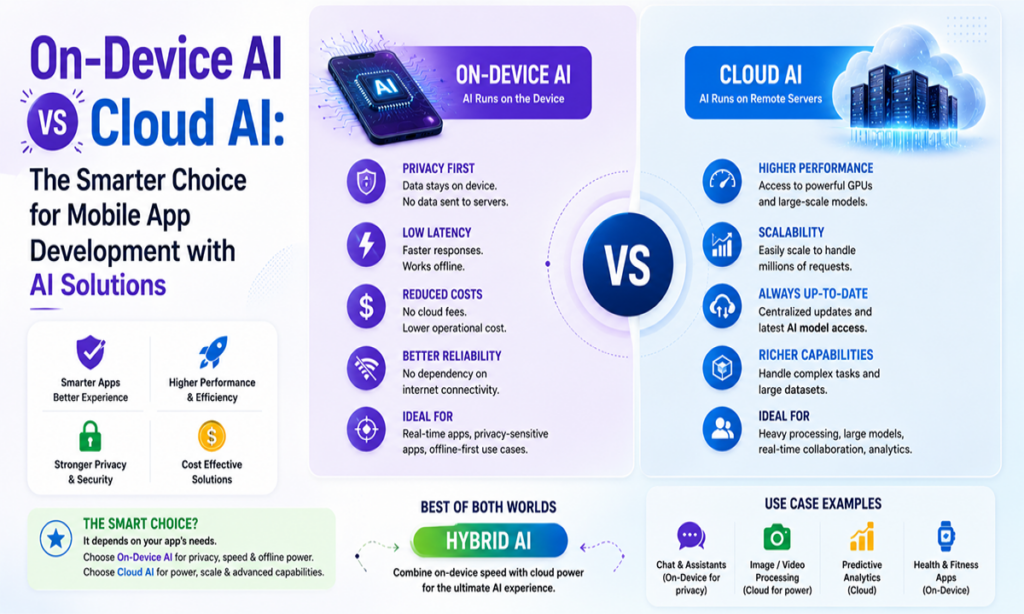
On-device AI is the right choice when your app needs speed, privacy, and predictability. On the other hand, cloud AI wins when you need the raw power of large models. This indicates the best AI architecture for mobile apps in 2026 is hybrid in lieu of picking one. That decision may seem minor, but it shapes your app’s latency, privacy posture, and unit economics from the very first sprint.
AI in smartphones is no longer new or rare. It is becoming a common feature in modern smart phones. Deloitte says shipments of smartphones with built-in generative AI grew to 234.2 million in 2024 and are expected to reach 912 million by 2028. This shows the rapid adoption of on-device AI. Here we explain how on-device AI and cloud AI work, with real-world comparisons of speed, cost, privacy, and performance. By the end, you’ll have an idea of an ideal approach for mobile app development with AI solutions.
The honest answer to which is better on-device AI or cloud AI is that it depends on the task. But for most modern mobile apps, the ideal choice is a hybrid. Because it runs fast and privately, performs common tasks on the device, and sends heavy, complex ones to the cloud. Here is the brief before we go deeper:
Speed: Modern smartphones with dedicated AI hardware can run many AI models in under 5 milliseconds, delivering near-instant responses according to Google’s LiteRT benchmark. In contrast, cloud AI typically adds 200–2,000 milliseconds of network and processing delay.
Privacy: On-device keeps data on the phone. The cloud sends data to third-party servers.
Cost at scale: On-device has near-zero cost per inference; however, the cloud bills every request.
Model power: Cloud runs frontier models with hundreds of billions of parameters. On-device can run smaller 1B to 20B parameter models only.
The verdict: Choose the AI approach based on what your app needs. A hybrid AI architecture usually gives the best balance of speed, privacy, performance, and cost.
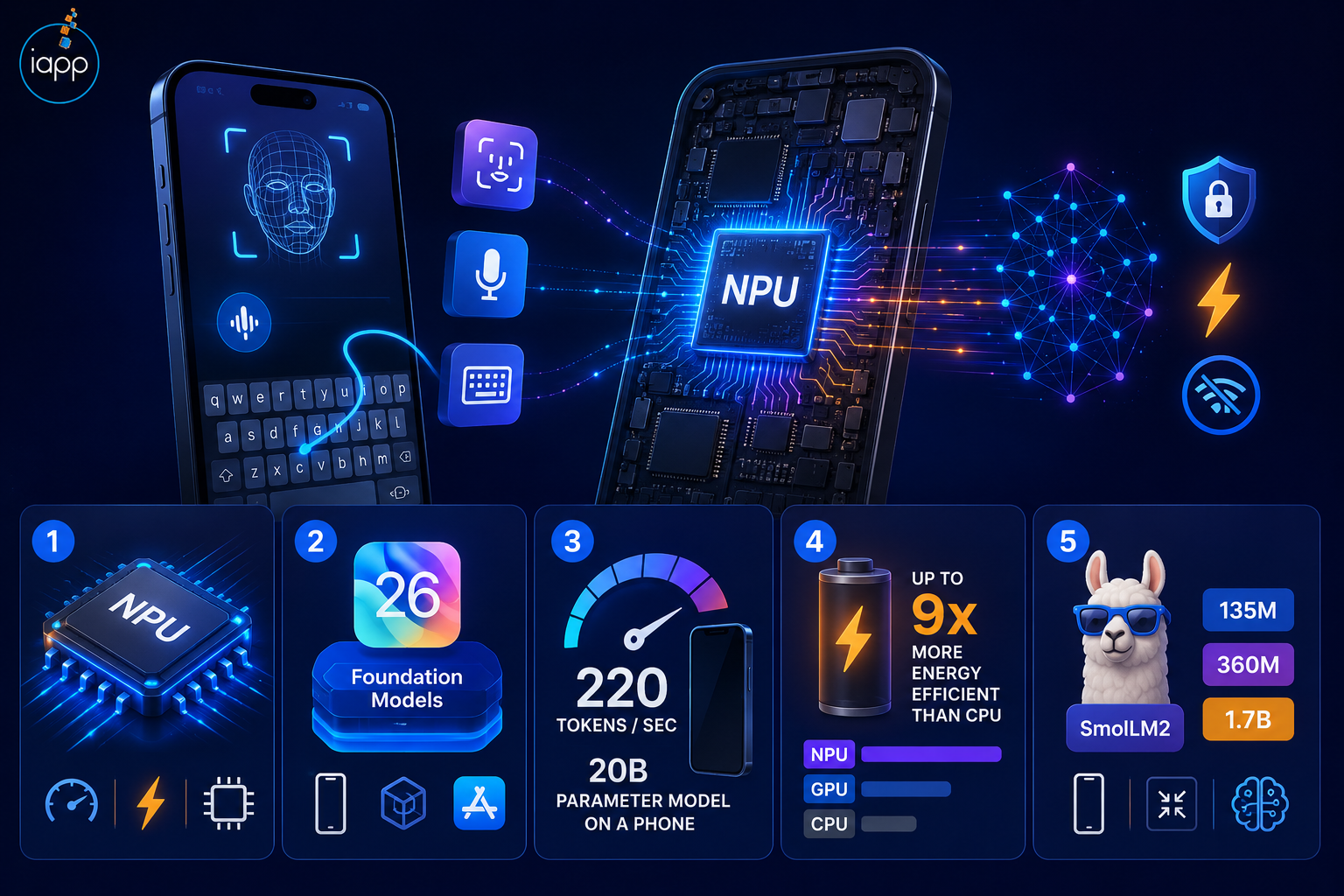
On-device AI implies the model is running right on the phone’s hardware, without a request to a server. The intelligence depends on the device’s CPU, GPU, or a specialized neural processing unit (NPU) developed for machine learning.
You already use it every day. Face ID to unlock your iPhone, offline voice typing, and smart keyboard recommendations all run on-device. They feel quick since none of them require a network connection.
The hardware finally makes these features viable, and the NPU is the main component. Qualcomm’s Hexagon NPU performs an industry-leading 45 trillion operations per second, and Google says that operating on the NPU provides up to 100x speed in comparison to the CPU and a 10x speedup versus the GPU. Apple’s Neural Engine, Qualcomm’s Hexagon, and Google’s Tensor processor all have the same goal: accelerating AI tasks directly on the device.
The rest gap is filled by software improvements. Quantization compresses an AI model without significantly affecting its performance. Apple distributes its on-device foundation model quantized to 2 bits. Meta says their quantized Llama models are 56% smaller and consume 41% less memory than full-precision models. It therefore runs effectively on frameworks like Apple Core ML and Google LiteRT (the successor to TensorFlow Lite). This is the basis of on-device machine learning.
Apple now ships a roughly 3-billion-parameter on-device model to third-party apps through its Foundation Models framework in iOS 26 (Apple).
Qualcomm’s latest Snapdragon NPU runs on-device models at up to 220 tokens per second and can even run a 20-billion-parameter model on a phone (Qualcomm).
Meta’s quantized on-device Llama models run 2 to 4 times faster than the full-precision versions (Meta).
Running AI on the NPU is up to 9x more energy-efficient than running it on the CPU (Qualcomm).
Compact open models now fit on a phone: Hugging Face SmolLM2 comes in 135M, 360M, and 1.7B parameter sizes (Hugging Face).
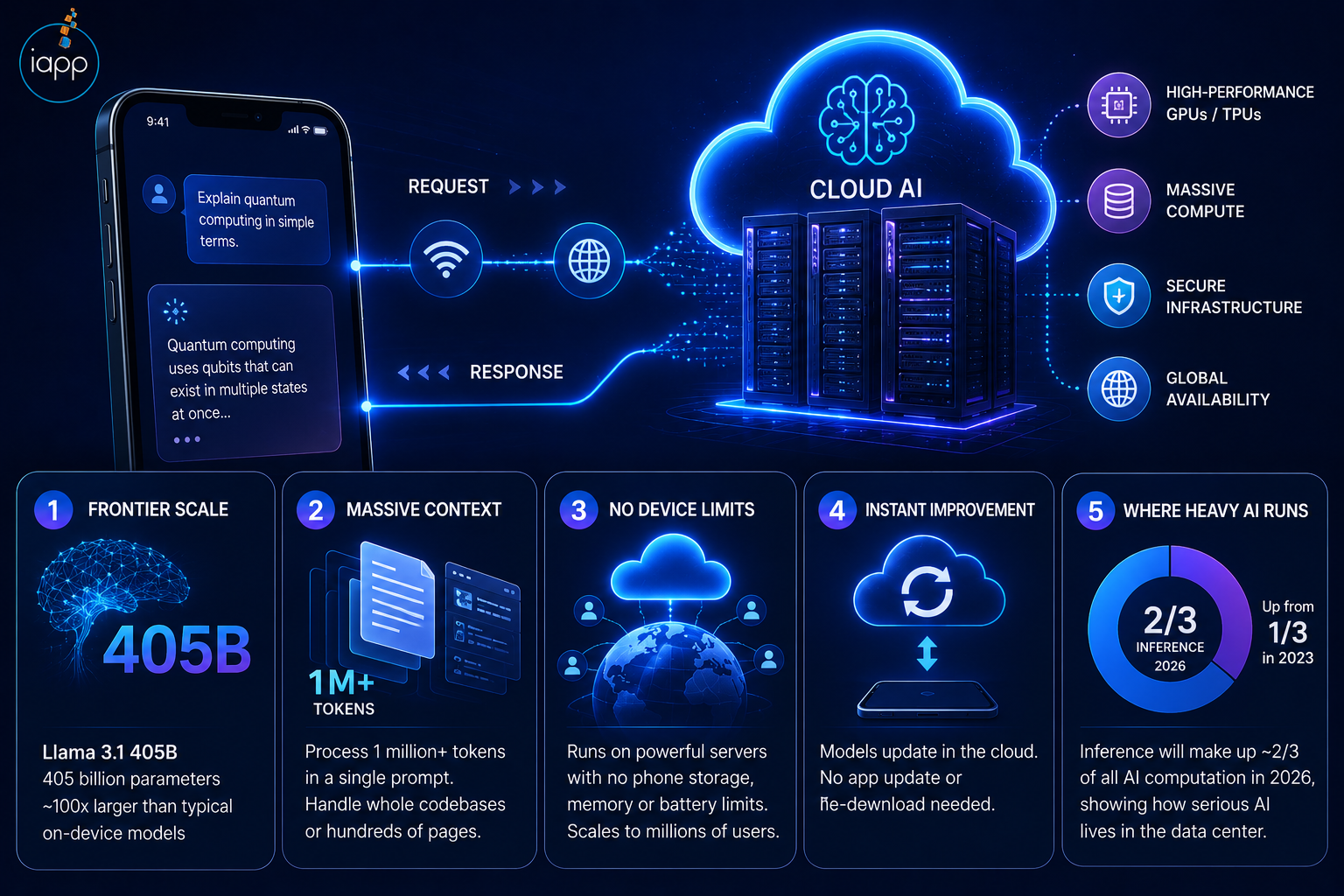
Cloud AI takes your request, transmits it to remotely located servers, runs it on high-end hardware, and then delivers you back the result via the internet. Remember, the model never resides on the phone. Therefore, the gadget solely deals with the network call.
Popular examples include massive language model chat assistants, streaming recommendation engines, and bank fraud detection systems that scan millions of accounts in real time. These types of applications need an extensive amount of computing power that any phone can provide.
The strength is obvious: infinite computational power and access to frontier-size simulations. However, these benefits come with a few trade-offs. Every request leaves the device, adds network delay, and gets charged for every call, and that’s become the core issue in AI-powered mobile apps.
Frontier scale: Meta’s publicly accessible Llama 3.1 405B has 405 billion parameters. This is almost 100 times the size of a normal on-device model (Meta).
Massive context: Google’s Gemini models are able to process context windows of 1 million tokens or more in just a single prompt. This is enough for whole codebases or hundreds of pages (Google).
No device limits: The model works on servers. Therefore, there’s no phone storage, memory, or battery limitation. This can serve millions of people at once.
Instant improvement: Since the model sits in the cloud, it updates quickly as the provider sends an update. This means no app update or re-download is needed.
Where heavy AI runs: Inference is projected to make up around two-thirds of all AI computation in 2026, up from a third in 2023. This shows how much serious AI still resides in the data center (Deloitte).
Also Read : How Much Does It Cost To Build A Mobile App In USA 2026
The real difference comes down to where the model runs, which decides speed, privacy, cost, and capability. On-device favors speed and privacy. Cloud favors raw power and simplicity. Here is the head-to-head with figures:
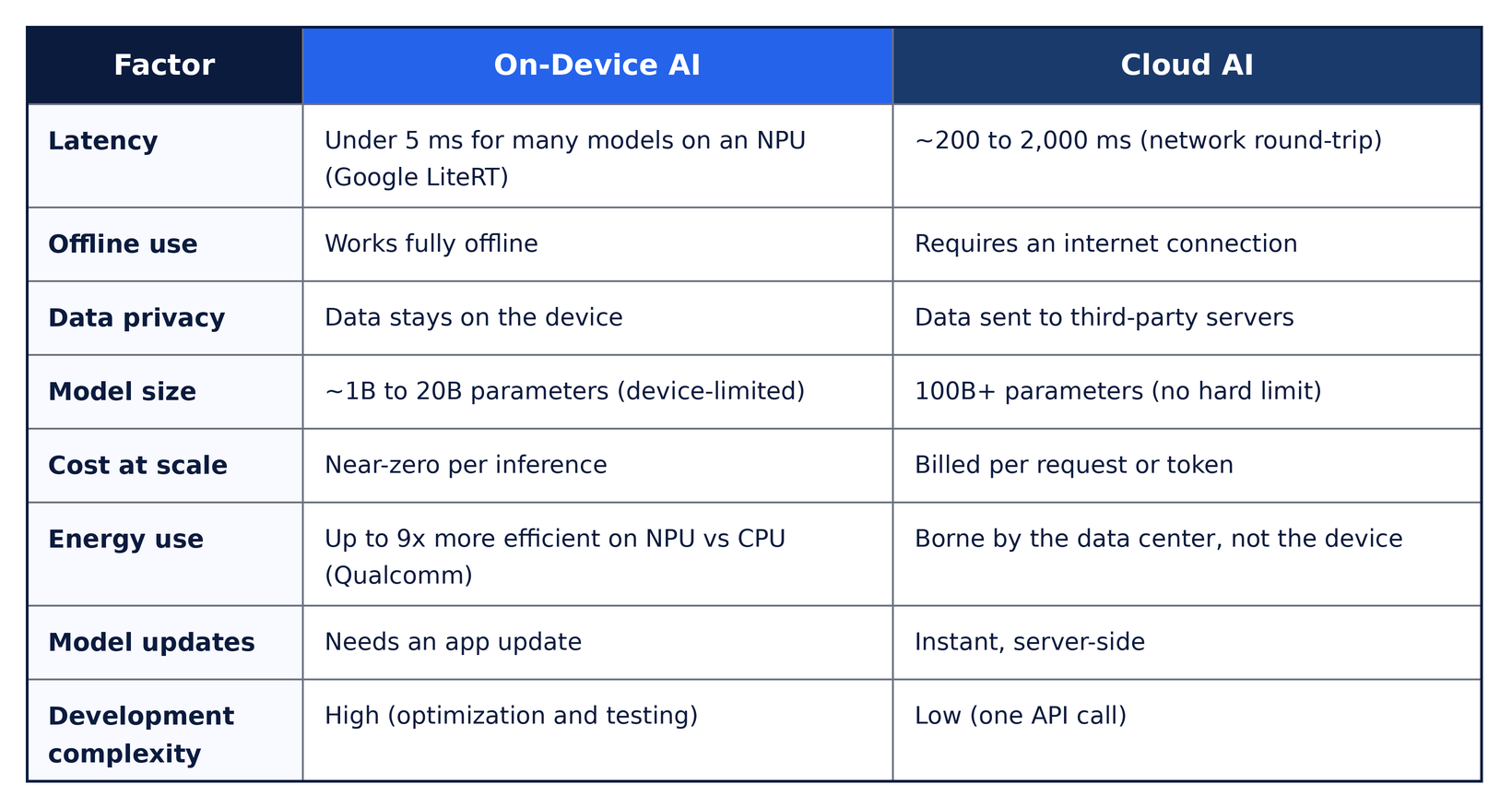
Why latency is so important: According to the Nielsen Norman Group, 0.1 seconds (100 ms) is the threshold for an action to seem instantaneous. A cloud round-trip often takes longer than that. Even a fast 5G network adds tens of milliseconds before a server performs any work, while on-device inference remains well under it.
A cautionary note: on-device does not automatically mean private. Your app could handle data locally, but if it sends complete logs, analytics, or error reports to a server, that data still leaves the phone. Privacy is a design decision, not a free side effect.
Plenty, and from every major lab, because small models now match older large ones on common tasks. These are real, shipping on-device models and their sizes:
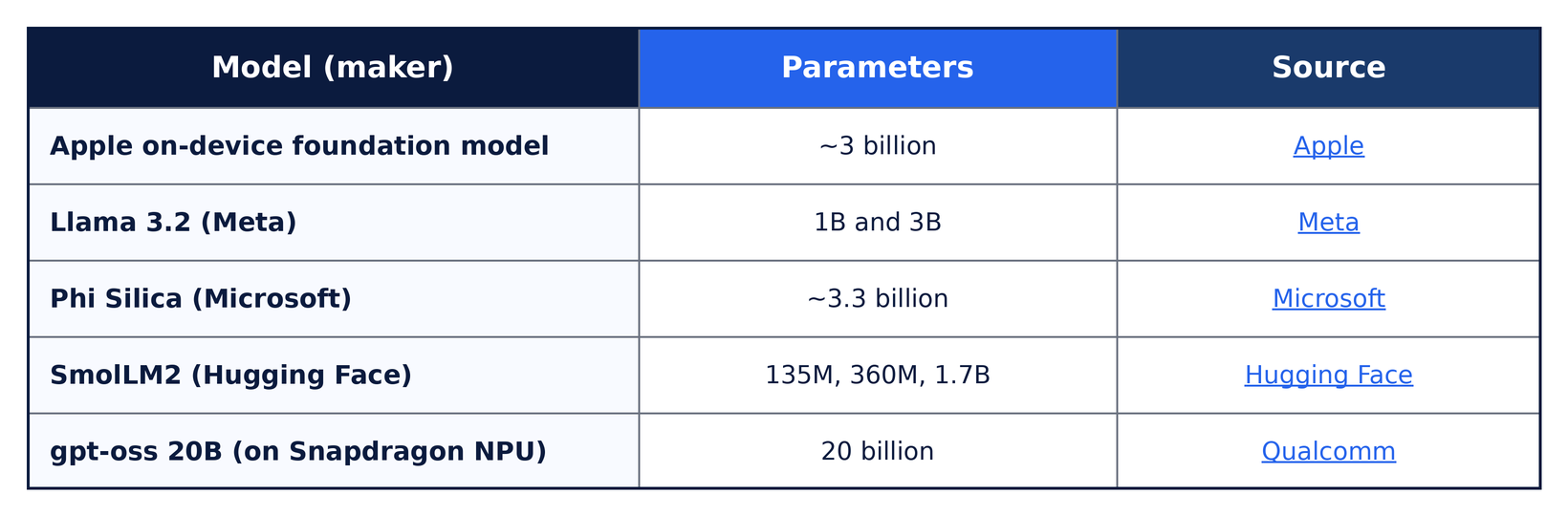
Frontier cloud models run in the hundreds of billions of parameters. Therefore, on-device is not the place for open-ended world knowledge or deep reasoning. But yes, it can perform summarization, categorization, extraction, and rewriting well.
Cloud AI is cheaper to start and more expensive to scale, while on-device AI costs more upfront and almost nothing per use after launch. The pivot point is volume.
In on-device core idea is zero marginal cost. Once a model is downloaded to the device, each inference costs essentially nothing beyond the phone’s electricity draw. There is no per-query meter running. Cloud AI, by contrast, bills every input and output token, and agentic flows that chain 10 to 30 model calls multiply that bill fast. Deloitte notes that as inference volume grows, cloud costs can spiral out of control.
Here is the cost shape, illustrative and dependent on model and token size:
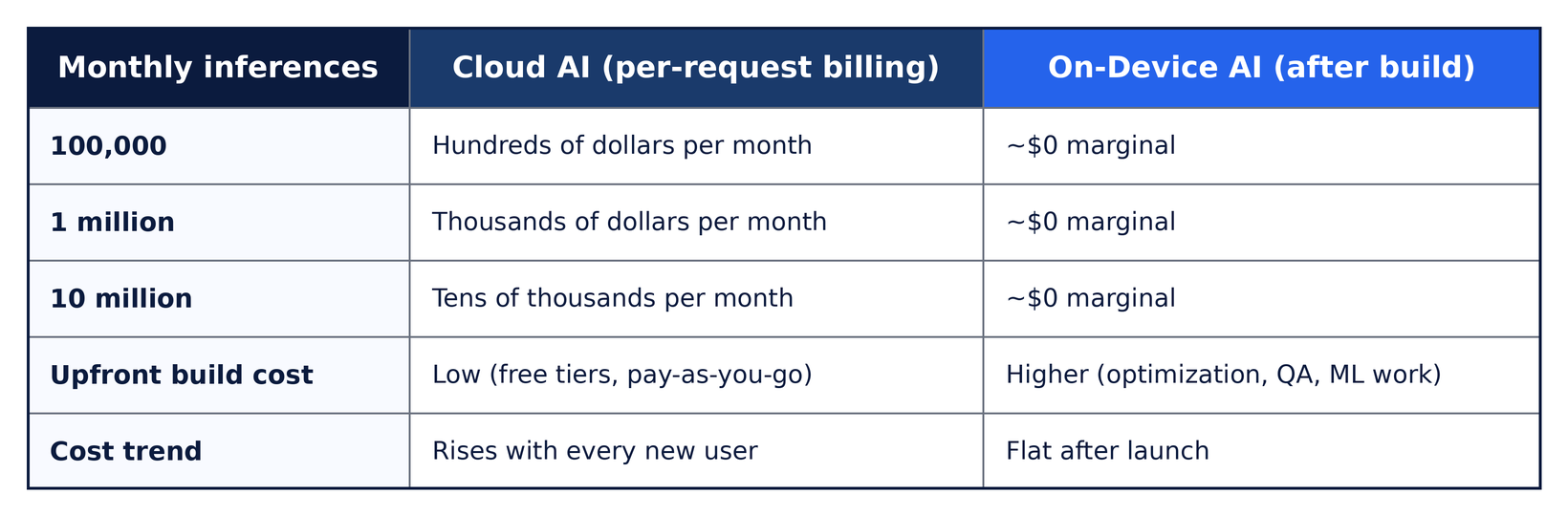
Original insight from production: The biggest challenge isn’t scaling the technology. It’s making sure the AI remains cost-effective when usage grows 10 times. Before shipping any AI feature, we model it at ten times expected usage across five variables: request frequency, model and token size, data-transfer overhead, update cadence, and the minimum supported device. It is important to note that a plethora of AI products do not fail because the technology breaks. They fail because the inference math stops working once real users arrive.
On-device AI is more power-efficient than most people assume, since NPUs are purpose-built to operate AI at extremely low watts. Offloading work from the CPU to the NPU is the key.
The numbers from silicon producers are real. Qualcomm found energy efficiency up to 9x greater when AI tasks run on the NPU instead of the CPU. Microsoft estimates their on-device Phi-Silica model consumes 56% less power on the NPU than on the CPU, with one context-processing cycle using only 4.8 milliwatt hours.
The practical takeaway: performing regular AI tasks locally on the NPU frees up the CPU and GPU for the app itself, protecting both responsiveness and battery. Cloud AI shifts that energy cost off the device and into the data center, but it compensates for it with latency and per-request costs.
Also Read : How to Build an AI App Like ChatGPT in 2026
On-device AI has the structural privacy advantage, because sensitive data never leaves the device. For health, finance, and biometric data, that single property removes the largest compliance risk.
This matters for regulated apps. A symptom-tracking health app that runs inference locally keeps medical data on the phone, which simplifies HIPAA and GDPR obligations and shrinks your audit surface. Cloud AI, in contrast, sends every query through a provider’s infrastructure governed by their terms.
But security is not one-way. Tools that read model weights may extract or reverse-engineer an on-device model from a user’s device. But there is a solution to improve security. Encrypt the model at rest, obfuscate it, and keep your most proprietary logic in the cloud. This decision is also influenced by legislation like the EU AI Act and GDPR, as deploying on-device reduces data transmission but still requires explicit documentation.
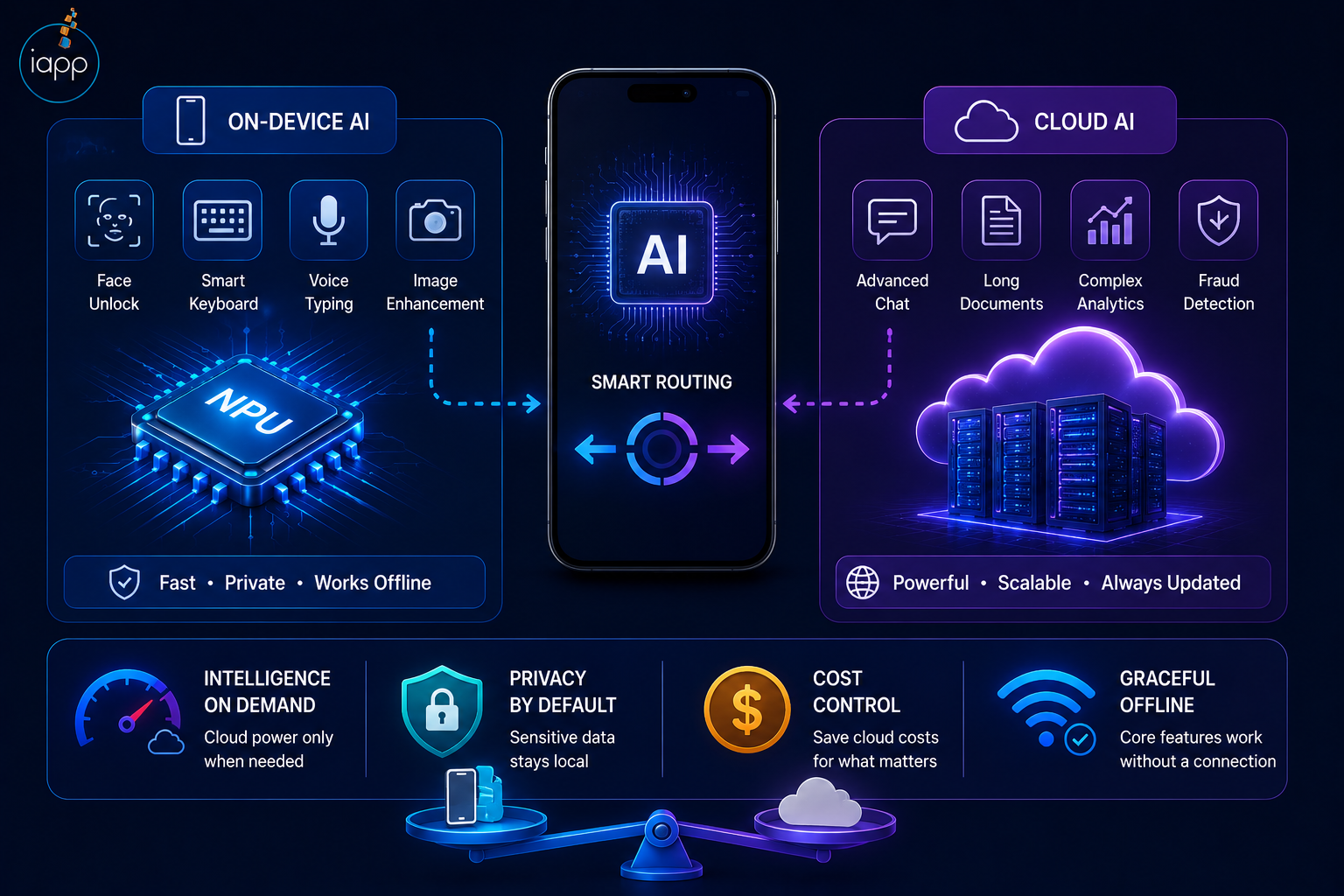
The most successful AI apps route work by task type. They run simple, high-frequency, private tasks on-device, whereas complex, low-frequency tasks go to the cloud. Remember, this is the production-standard pattern, not a compromise.
The major platforms already work this way. Apple pairs a roughly 3-billion-parameter on-device model with a larger server model on its private cloud compute platform and routes by task, per Apple. Microsoft built the same split into Windows, using small on-device small language models on the NPU alongside cloud large language models. The user simply experiences a fast, capable app.
The benefits of a hybrid AI architecture stack up:
Intelligence on demand: cloud power only when the task truly needs it.
Privacy by default: sensitive data stays local; non-sensitive data is offloaded.
Cost control: you stop paying cloud fees for tasks the phone can do for free.
Graceful offline behavior: core features keep working without a connection.
Skip the hype and answer six practical questions. Each one pushes you toward on-device, cloud, or a hybrid split.
Does the feature need to work offline or on weak networks? If yes, on-device is essential.
Is the data sensitive (health, finance, biometric)? If yes, lean on-device.
Does the experience need to feel instant (under 100 ms)? If yes, process on-device.
How large is the model you actually need? A small classification or ranking fits on-device. Large generative reasoning fits the cloud.
What is your volume in the next 12 to 18 months? Big growth makes on-device economics attractive sooner.
Does your team have ML and optimization bandwidth? Small teams often start in the cloud and add on-device later.
The option between on-device or cloud is an architectural decision made throughout the design stage, not a bolt put on at the end. The way you deliver AI features in mobile apps starts with this decision. In real custom mobile app development it sits between discovery and model selection, shaping everything downstream. This decision affects many parts of the app, including its performance, privacy, cost, internet dependency, battery usage, user experience, and even which AI model can be used.
Clearly assigning each AI task to the right place (on the device or in the cloud) makes the app easier to build, manage, and maintain.
Classification, ranking, autocomplete, and lightweight recommendations run on-device at near-zero cost.
Multimodal generation, long-context reasoning, and deep analysis are routes to the cloud, where capability is worth the price.
Latency-sensitive or offline features stay on-device by default.
Always design an app with a backup plan. When on-device inference fails or there is no connectivity, the app should not break completely. Developing teams that treat edge AI as a first-class architecture decision, in lieu of a late add-on, often deliver products that are faster, affordable to run, and easier to scale. That is the difference good mobile app development with AI solutions makes.
Here is what we have learned shipping AI features across real products at iApp Technologies, a mobile app development company USA businesses trust.
In a cross-platform video editor we built, filter and effect previews had to update the instant a user swiped. Routing each preview to the cloud would have added a visible 200 to 500 ms lag and broken the 100 ms instantaneous threshold. Therefore, the preview pipeline runs on-device while only final exports touch heavier processing.
In the interior-design visualization software, we make sure that rapid interactions, masking, item selection, and live viewing occur on the device. Additionally, the cloud hosted heavy picture production processes, where we stored the large models. The hybrid pattern should function as intended, providing users with an immediate and responsive canvas while still delivering high-quality outcomes.
In a macOS voice note app, transcription accuracy mattered, but so did privacy, because meeting audio is sensitive. Running transcription on-device meant audio never had to leave the machine for the core feature. This protected users’ privacy if it ever became a support ticket.
A fitness app needed to track workouts offline at the gym and handle biometric data carefully. Keeping that logic on-device delivered both: no dropped sessions on weak Wi-Fi and no biometric data broadcast to a server.
The hard-won lesson across all four: the real cost of on-device is not inference; it is operations. Device fragmentation, model versioning across app versions, and battery tuning are where projects stall. Plan for those during architecture, not after launch, and the custom mobile app development process stays predictable.
The trend is more competent models operating locally and better routing between device and cloud. NPUs are already standard on flagship and mid-tier chips, while edge-optimized open models continue to decrease the capability gap.
Four developments to watch out for: small models achieving production quality in an efficient way, NPUs in almost every new phone, on-device fine-tuning using federated learning and privacy-first AI becoming a default user expectation rather than a premium feature.
So, the ideal solution depends on your users’ expectations for speed, privacy, and cost. Means there is no universal winner between on-device AI and cloud AI. For most applications a combination of both gives the greatest experience. Make it a key architectural option at design time, not an afterthought at the end. This way your app will remain fast, compliant, and economical as it expands. If you are planning AI features and want the architecture right from day one, then speak to the custom mobile app development team at iApp Technologies for a free consultation on mobile app development with AI solutions.
On-device AI uses a phone’s CPU, GPU, or NPU to process data locally, without the need for an internet connection. Cloud AI uses distant servers to perform larger AI model processing. On-device AI is all about speed and privacy, whereas cloud AI is all about computational power.
On-device AI is great for things like transcription, categorization, autocomplete, and picture processing. Cloud AI models can handle complicated reasoning computationally and complex tasks well. Most recent mobile applications have a hybrid AI design that incorporates both.
Generally, on-device AI offers greater privacy since sensitive data remains on the user’s device and is not transferred to outside servers. This makes it perfect for healthcare, financial, and biometric applications where securing the user data is of utmost importance.
Yes, on-device AI still works without an internet connection since the AI model runs directly on the device. To utilize Cloud AI, you need a network connection since requests are handled on distant servers.
Cloud AI is often less costly to start with but more expensive as demand develops since you pay per request. On-device AI needs more upfront development work but has nearly zero cost per inference, making it more cost-effective at scale.
A lot of lightweight AI models are now efficiently running on today’s smartphones, such as Apple’s Foundation Model, Meta’s Llama 3.2, Microsoft’s Phi Silica, and Hugging Face’s SmolLM2. These models are optimized for quick, private on-device inferencing.
Not considerably on advanced hardware when optimized. Neural Processing Units (NPUs) are specialized hardware accelerators for AI tasks, which use significantly less power than executing the same workloads on the CPU or GPU. This helps keep battery life up while ensuring quick performance.
Yes. The model is saved on the user’s device, which means it may be removed or reverse-engineered. Developers encrypt models, obfuscate the code, and store secret AI logic on secure cloud servers to avoid such risks.
The hybrid AI architecture blends on-device AI with cloud AI in the same application. Fast, private, or offline processes operate locally, whereas complicated processing happens in the cloud. This is the optimal trade-off between speed, privacy, cost, and scalability.
Price varies based on AI capabilities, model intricacy, and implementation method. Cloud AI provides cheaper upfront expenses but charges for ongoing usage, whereas on-device AI needs more development work upfront but has lower running costs over time.
The majority of businesses start with cloud AI, as it’s quicker to build and cheaper to get started on. As use expands, offloading high-frequency or privacy-sensitive functionality to on-device AI may cut costs and enhance the user experience.
You don’t need a local app development business to launch a successful app. Most projects run remote. Thus, prioritize proven experience, proficiency in AI, customer testimonials, and a solid portfolio above physical location.
 Jagwinder Singh
Wait! Before you go…
Talk to our experts and turn your ideas into powerful digital solutions.


 Trusted by 1000+ businesses

Fill out the form and our team will get back to you shortly.