
Developing an AI-powered mobile app is about addressing one real user issue with a single high-value AI feature, selecting the right place to run the model, and delivering a focused MVP that you can improve with user feedback. This AI app development guide will shed light on the complete AI app development process step-by-step, from choosing AI features and preparing data to selecting the right AI models and tech stack.
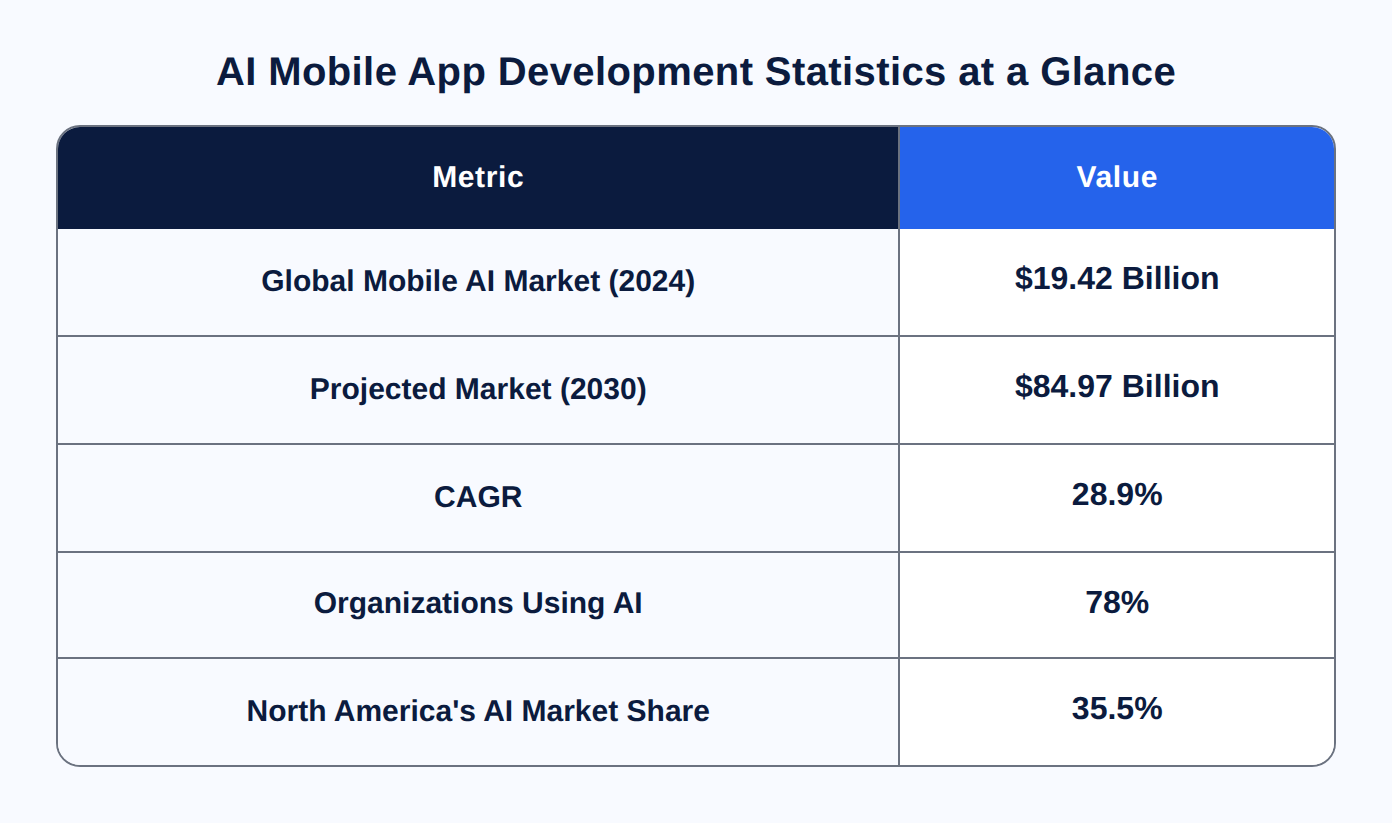
The demand for mobile app development with AI is growing at a rapid pace. As per Grand View Research, the worldwide mobile artificial intelligence market was around $19.42 billion in 2024 and is expected to reach $84.97 billion by 2030, growing at a 28.9% CAGR. Whether you are an individual founder or a corporation, the process remains the same. With advanced AI tools and APIs, it's now much easier and more affordable than ever to build AI-powered apps.
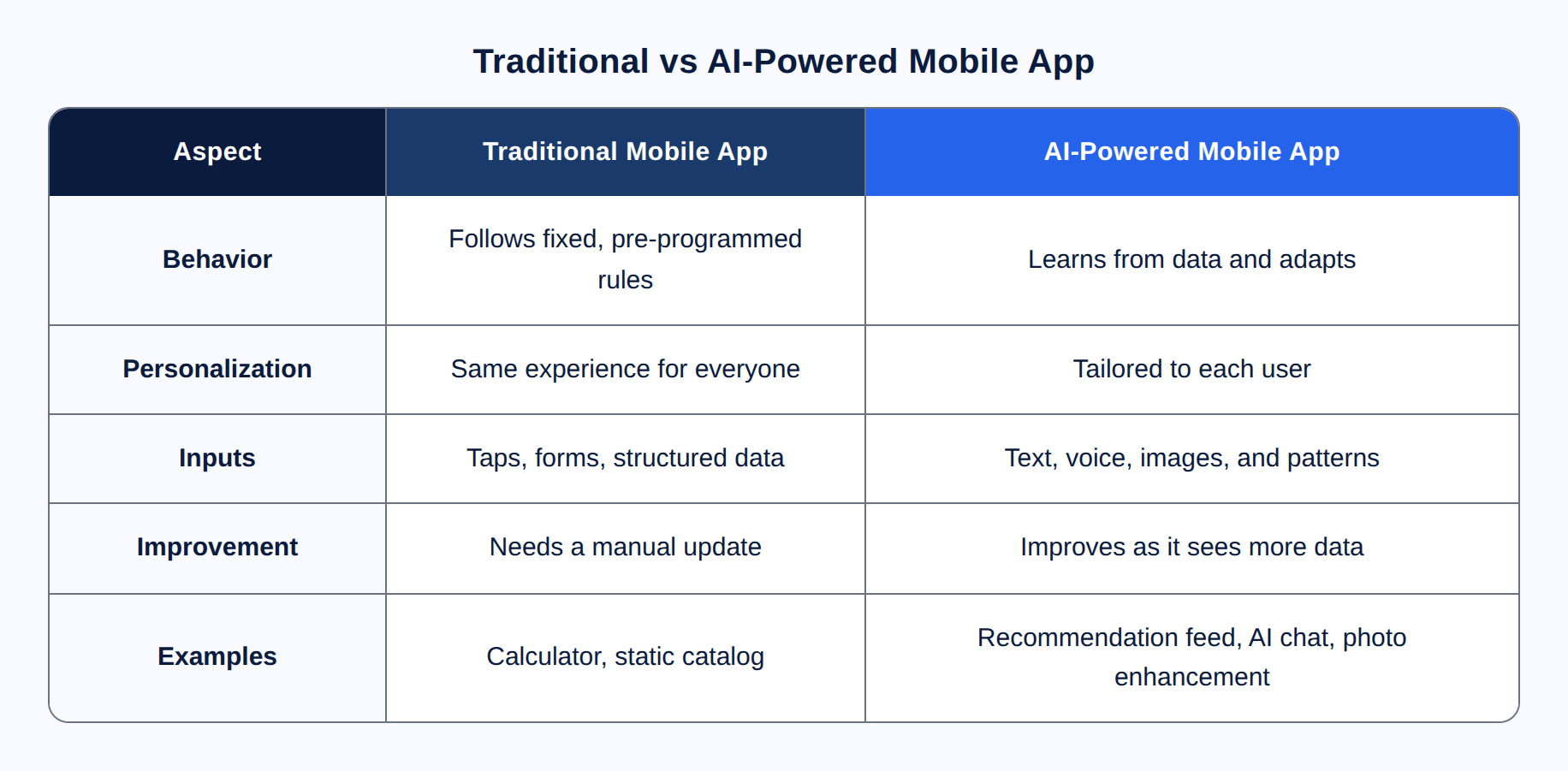
An AI-powered mobile app is an app that harnesses the power of machine learning to achieve something that set rules cannot do. It learns from data, customizes itself to each user, as well as makes predictions or creates content in real time. A standard software follows preprogrammed instructions, whereas an AI app gets better as it observes more data.
AI doesn't make the entire app intelligent; however, it is added as specific features inside the app. Typical areas include:
Recommendation engines
Natural language processing (NLP) for chat and search
Computer vision for photographs and scanners
Voice and speech features
Predictive analytics
Generative AI for text or images.
The key difference lies in personalization and flexibility. Unlike a standard catalog that displays everyone on the same page, an AI feed customizes itself depending on what each user taps, views, and buys.
US businesses are investing in AI because it improves the metrics that really matter. For instance, retention, personalization, and automation. A few years ago, companies were just testing AI, but now adoption is no longer just an experiment. In 2025, 78% of organizations utilized AI in at least one business function, which is quite high from 55% in 2023, as per the McKinsey report.
The economic pull is just as evident. According to PwC, AI will contribute approx. $15.7 trillion to the global economy by 2030. What's more? North America is expected to be the second biggest winner with a 14.5% increase in GDP. North America also has the largest share of the global AI industry in 2025, i.e., 35.5%. This is why the demand for AI mobile app development USA services continues to grow.
Businesses are investing in AI, just not because of trends. It gives real business benefits. AI increases engagement via personalization, reduces support costs via AI chat and automation, and opens new income streams through capabilities rivals don’t have. That’s why several organizations are increasingly integrating AI into their mobile app development services roadmaps, rather than just considering it as a side project.
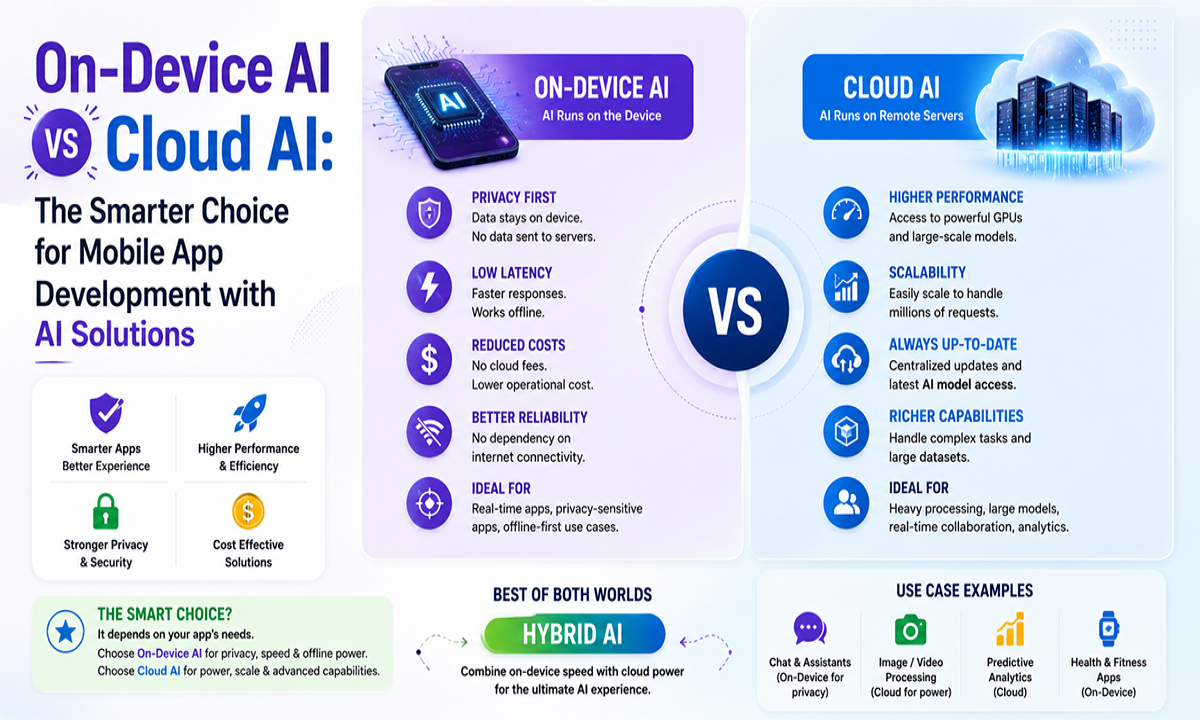
The great thing about on-device AI is that it gives you robust privacy, high speed, and offline usage. Cloud AI is great for heavy, general-purpose work. However, most production applications are a combination of the two.
On-device AI runs the model on the phone locally. On iOS, it means Core ML and the Apple Foundation Models framework. These provide developers an approximately 3 billion parameter on-device model with inference that runs at no token cost. Google ML Kit offers free, on-device vision and language APIs that run offline on Android. Also, you can run a custom model on the Android phone using LiteRT.
Cloud AI requests a hosted model via the network, like huge language models from OpenAI, Anthropic, or Google Gemini. With this technology, you get access to greater power and bigger models but need to pay a per-token cost that grows with consumption. Also, users have to face network latency.
In practice, hybrid is the ideal solution. Google’s recommendation is to use local models for small text and cloud models for bigger or more difficult tasks. This keeps a balance between speed and privacy because only heavy operations are transferred to the cloud.
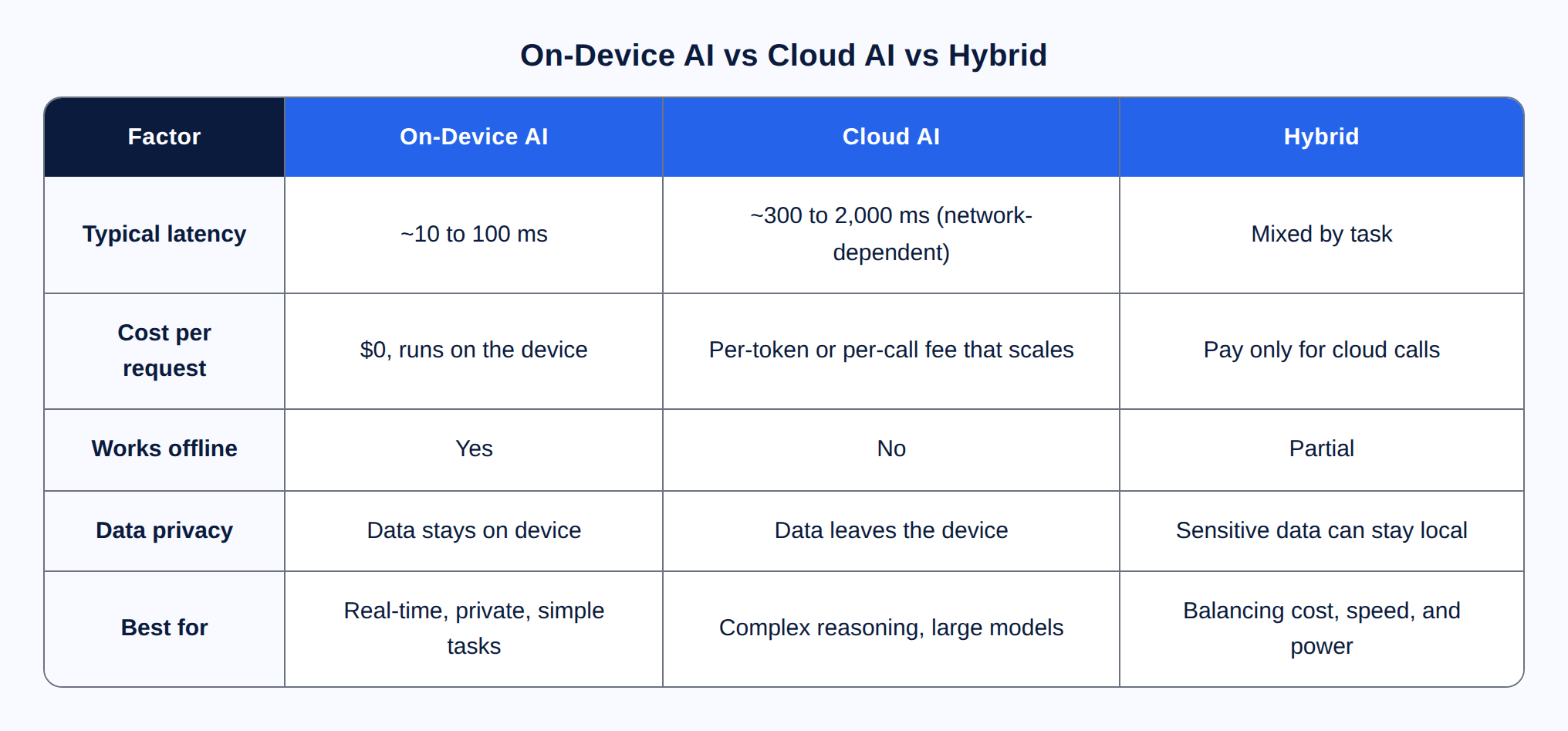
On-device AI is an ideal choice for privacy and offline functionality, as well as real-time performance.
Cloud AI provides more computing power. This makes it the great pick for complex AI tasks.
Hybrid AI gives you the best of both worlds. It combines speed, privacy, and scalability. That is why it is a preferred choice for most production apps.
The AI app development process consists of 7 basic processes, from problem validation to launch and monitoring in production. Think of this sequence as a checklist, since the most common reason AI programs stop is skipping the early steps.
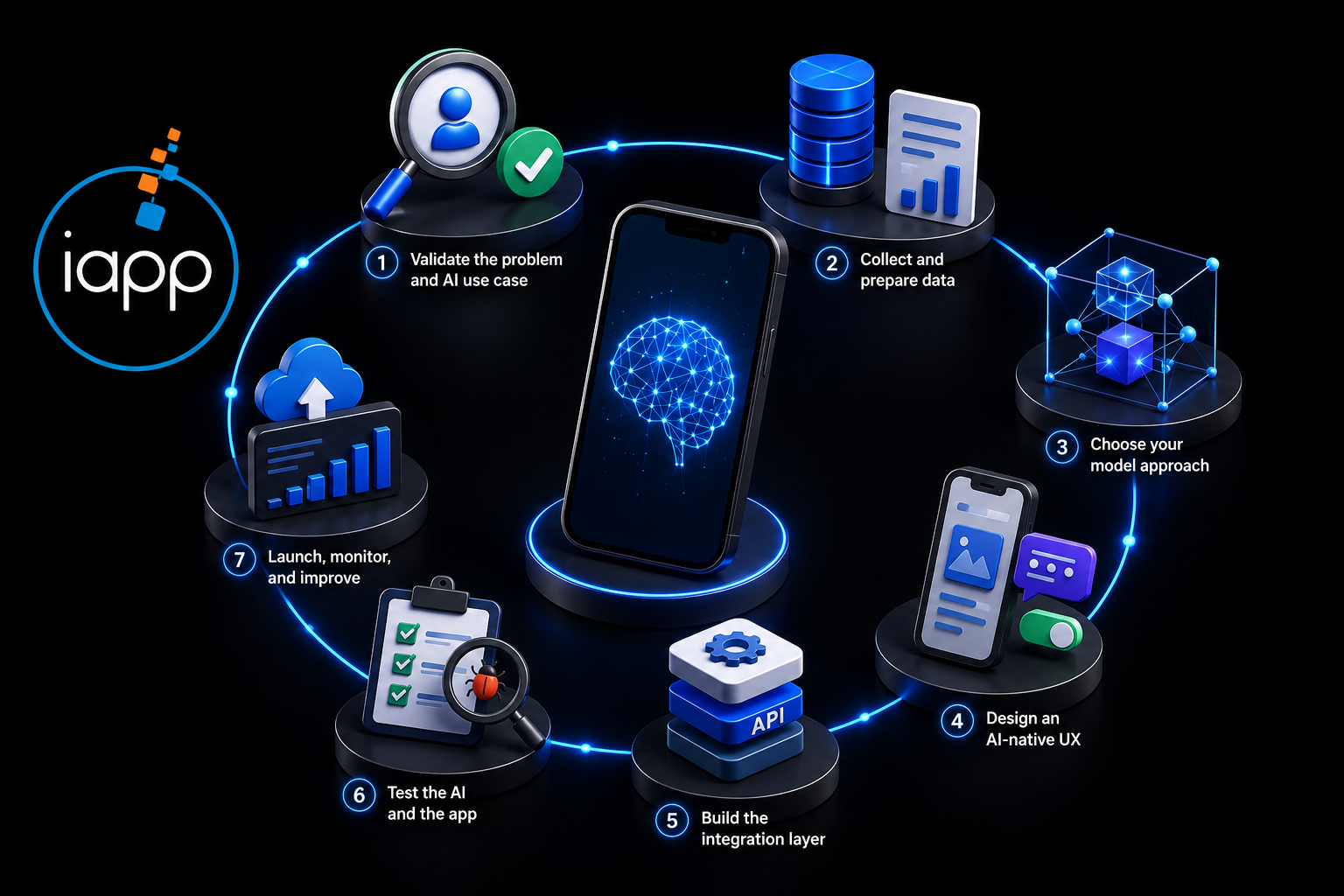
Confirm real user pain that AI actually solves better than rules. If a simple feature works, you may not need AI at all.
Collect relevant, clear data for the feature. Bad data is the No. 1 reason AI features underperform.
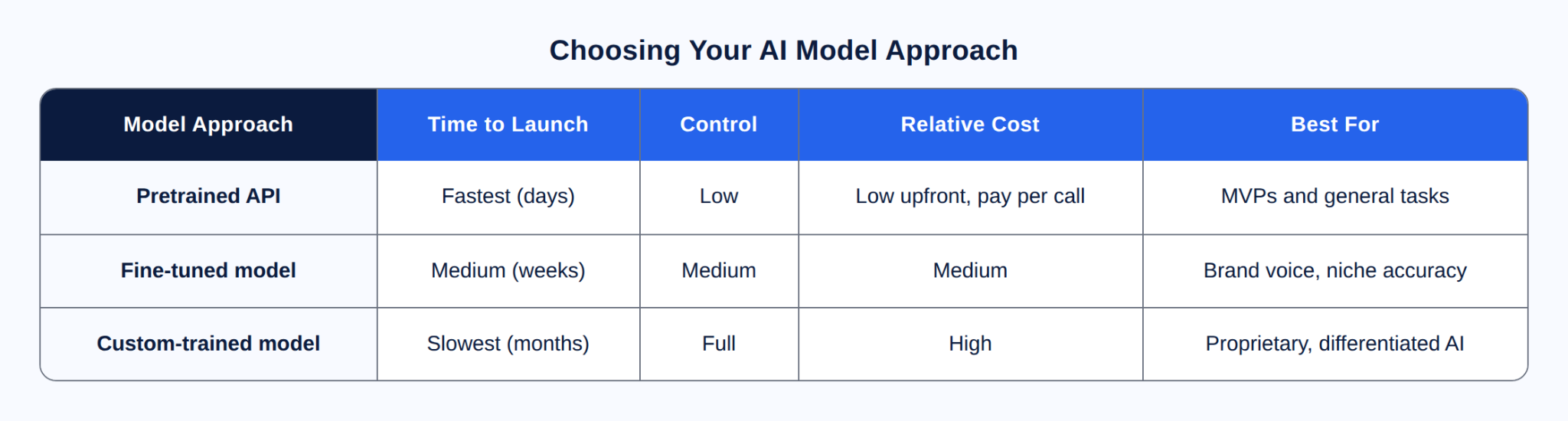
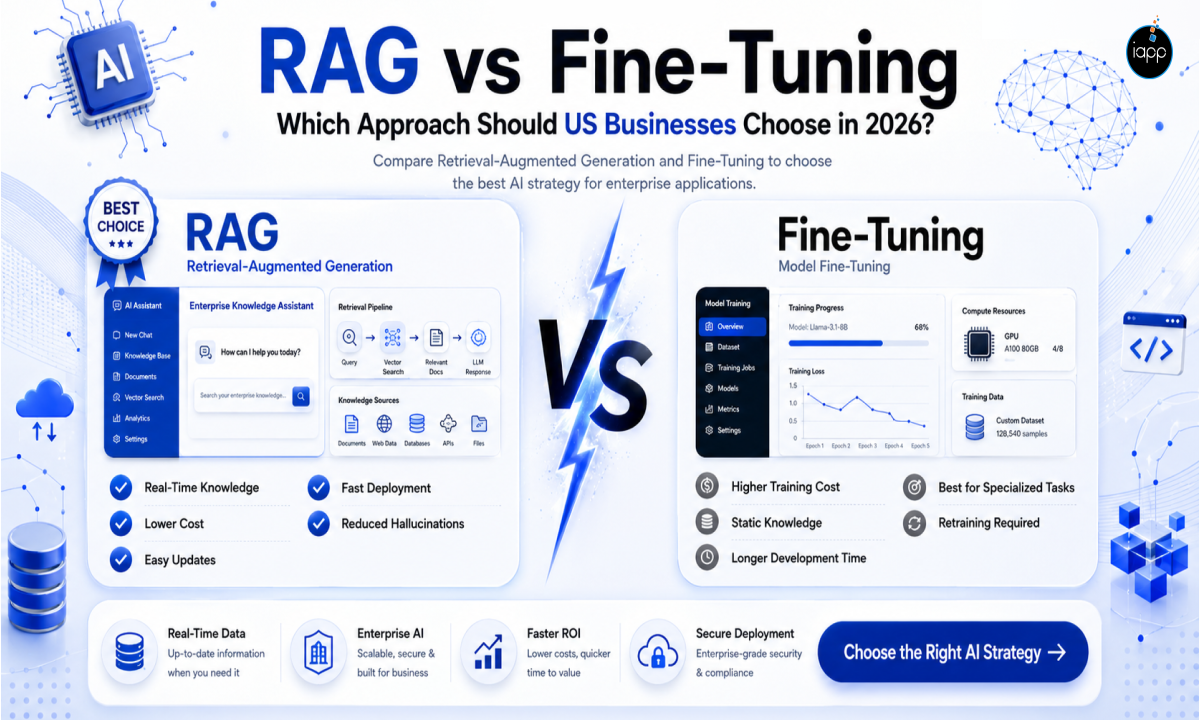
Pick a pretrained API, a fine-tuned model, or a custom-trained model depending on speed, control, and budget.
Have confidence, allow users to change outputs, and always have a backup strategy for when the model is sluggish, offline, or inaccurate.
Keep your app UI separate from the inference layer so you can swap models later without a rewrite.
Perform regular app QA and AI-specific QA for accuracy, bias, edge cases, and latency.
Ship to the App Store and Google Play, then watch for model drift and retrain or tune as real usage grows.
Pro tip: Begin with one AI feature. Remember, a single feature that actually works beats three that feel unreliable.
Native development is right for optimal on-device AI support and maximum performance. On the other hand, cross-platform development is ideal for quick launch on both iOS and Android. After choosing the stack, the next step is to match your AI model. Remember, there is no one-size-fits-all solution. The right choice depends on your business goals, project timeline, and budget.
For native development, iOS uses Swift, whereas Android uses Kotlin. This process allows you full access to the neural engine and on-device frameworks. However, cross-platform uses Flutter or React Native and ships one codebase to both stores and eventually speeds up MVPs.
The on-device solutions for the AI layer include Core ML, LiteRT, ML Kit, and Gemini Nano for edge generative AI. Cloud alternatives include hosted APIs from OpenAI, Anthropic, and Google Gemini for running open models without maintaining servers.
When you choose custom AI app development, you get more accuracy and robust IP ownership. This could be done by fine-tuning or training your own model. However, it takes more effort, cost, and data.
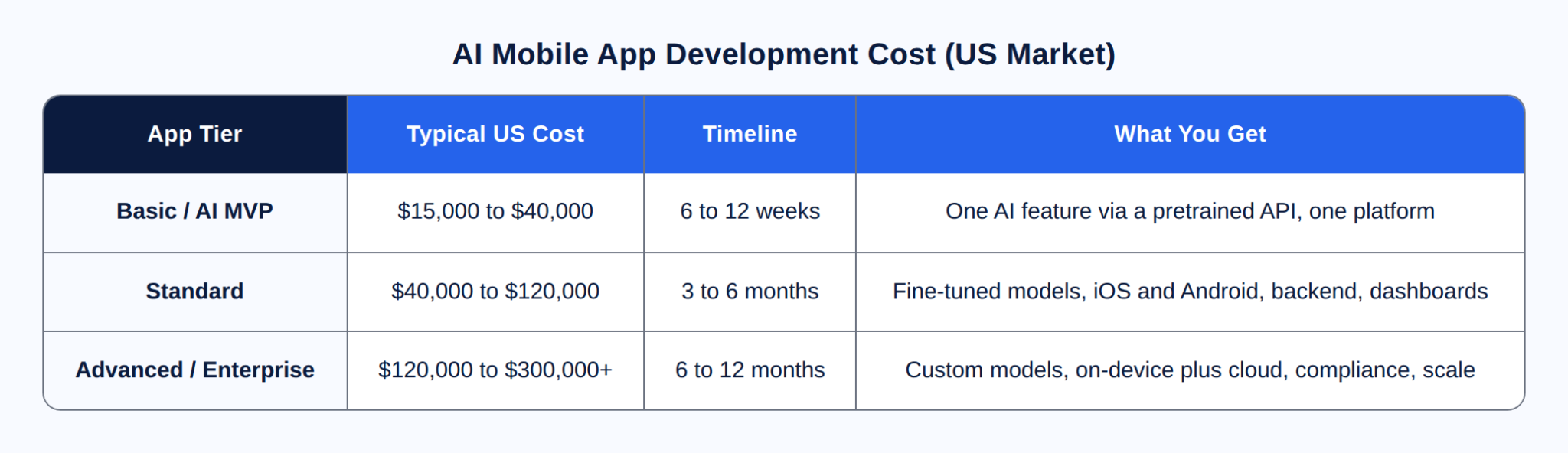
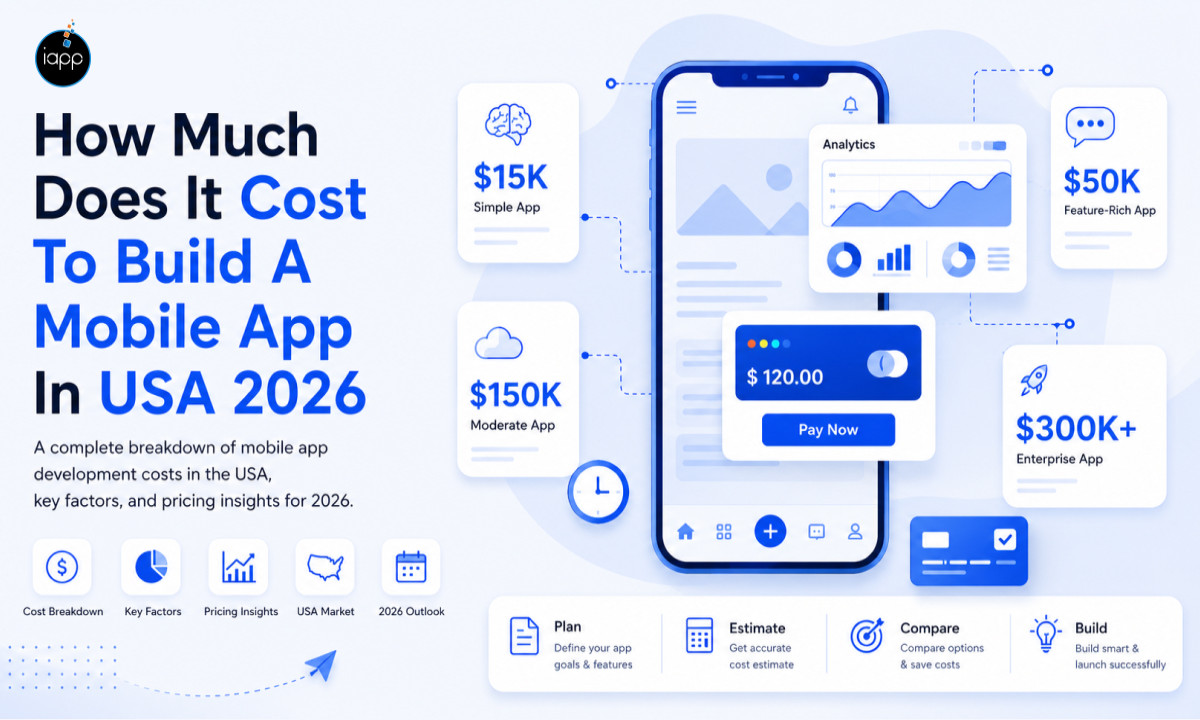
In the US market, a basic AI MVP will cost you from $15,000 to $40,000, a normal app with fine-tuned models from $40,000 to $120,000; and complex, enterprise-grade AI applications start at $120,000 and above. That’s an extensive range, since scope follows cost, not the word “AI.”
The largest cost factors are the size and pace of the team as well as the amount of data preparation required. Apart from this, the choice between a pre-trained API or training a custom model, the number of platforms you serve, and cloud infrastructure also matter. Compliance and scale contribute more to that.
Don’t overlook the ongoing fees. Cloud inference is charged per active user. Also, you should allocate around 15% to 20% of the construction cost each year for maintenance, model upgrades, and monitoring. On-device inference helps here, since there is no per-call expense for running the model on the phone. This is where the budget of AI mobile app development in the USA might vary greatly. Therefore, scope the feature set before you commit to a number.
These are indicative US market ranges based on current rates, not fixed quotes. Your actual cost depends on features, data, as well as the platform.
The greatest approach to learning is to look at AI apps that have been actually released and are used by real consumers, not just ideas, presentations, or demo versions. Two of our AI projects show how the choices discussed above help build successful real-world products.
The problem: We had a client who wanted an app where users could point their phone at a room and see it remodeled, but with only one piece altered. For instance, switching the couch and nothing else changes. AI tools often redraw the whole image, so the app would relocate the windows, downsize the space, or repaint the walls too. The result appeared artificial, and users immediately saw it.
How we built it: We built the app to act like a careful editor, not a painter beginning again. It finds precisely where the couch is, forms an invisible outline around it, and only adjusts what is within the outline. This leaves the true shape and size of the room the same. It’s created in Swift and SwiftUI for iPhone, and it uses two AIs: an image-generation model to create the new appearance, and an object-detection model to highlight the things in the shot. Heavy AI works on a cloud service (Replicate), so the phone remains speedy.
The result: The client's user gets a redesign that resembles their actual room, with just the section they selected modified. The main lesson this project guides us through is that from mobile app development services, clients expect control.
The problem: Another customer requested an app that could listen to a meeting and transform it into an exact written record, live. And the toughest thing wasn't accuracy; it was money. The most powerful AI models charge by the minute, and those fees add up quickly if thousands of individuals record meetings each day.
How we built it: We did not employ a large, expensive AI but rather a model particularly created to translate voice to text. The good thing is that it accomplishes the job effectively with much less overall cost. We developed the app natively in Swift for Mac. It translates audio into text in real-time while the meeting is taking place. Moreover, we isolated the AI from the rest of the app. This way we could replace the model with an inexpensive or better one later without having to rewrite the whole code.
The result: Clear, dependable transcripts at a price that can scale. The lesson, and a big part of custom AI development, is that picking an AI model is a business decision as much as a technical one.
Successful AI-powered mobile apps usually follow a few proven principles:
Start with one AI feature before expanding.
Use pretrained models whenever possible for MVP development.
Keep AI outputs editable by users.
Build fallback workflows for AI failures.
Protect user privacy with on-device processing where appropriate.
Monitor inference costs as your user base grows.
Continuously retrain or fine-tune models using production feedback.
Trying to add AI where simple logic can work better.
Launching multiple AI features instead of validating one.
Ignoring AI inference costs as the user base grows.
Collecting poor-quality training data.
Forgetting fallback experiences when AI fails.
Choosing custom AI models too early.
Not monitoring model performance after launch.
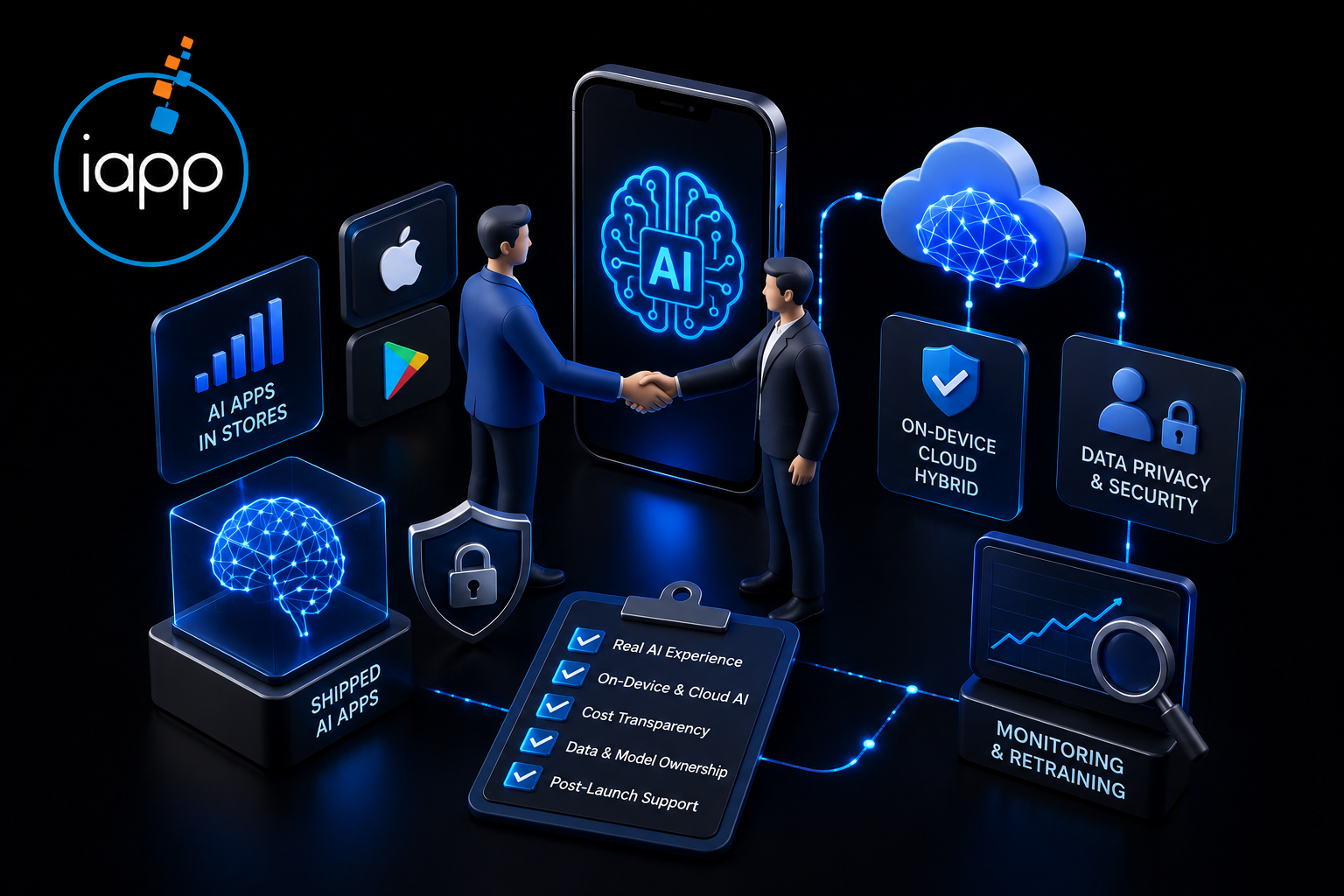
When you assess mobile app development services, seek a genuine portfolio of AI applications in the stores and hands-on expertise with on-device frameworks and cloud APIs. Also, don't overlook data protection and security and post-launch strategies for monitoring and retraining. Ask who owns the model and the data after project completion. Remember, a polished pitch is easy to craft, but a functional AI feature in a real app is not.
Here are a few questions you should ask during sales presentations:
Can you tell me about an AI feature you delivered?
Will it be on-device, in the cloud, or hybrid? Why?
What is the ongoing inference + maintenance cost at 1000 and 100,000 users?
Once trained, do I get ownership of the model & data?
In case you are thinking about a build, our experts offer production-grade AI and custom AI app development for iOS and Android. Check out our mobile app development services to learn how we do it.
The most important thing about building an AI-powered mobile app isn’t chasing the largest model. It's about addressing one specific issue effectively, picking between on-device or cloud smartly, and launching an MVP you iterate on with real data. In the beginning, focus on the most crucial feature and monitor your inference cost. For AI Mobile App Development USA projects, the difference between a demo and a product is disciplined execution, not the flashiest tech.
Businesses that solve a particular user problem, choose the correct AI architecture, and constantly improve their models are more likely to produce AI-powered mobile applications that scale effectively.
Ready to build? Find out more about our mobile app development services or schedule a consultation for a scoped estimate of your AI app.
Here are the most common questions that people ask when following an AI app development guide.
The cost of AI mobile app development in the USA often varies between $15,000 to $40,000 for an MVP. It's around $40,000 to $120,000 for a normal app and $120,000+ for corporate solutions. However, the actual price depends on the complexity of AI, the platforms, and the integrations. The pricing also depends on whether you utilize prebuilt AI models or bespoke AI models.
It takes around 6-12 weeks to develop a simple basic AI mobile app. For more complicated applications with bespoke AI models, numerous platforms, and backend systems, it usually takes 3-12 months.
No. Most AI-powered mobile applications are built using pretrained APIs and SDKs like Core ML, ML Kit, OpenAI, or Google Gemini. In case you’re building or modifying customized AI models, you really just need machine learning knowledge.
On-device AI is operated on the user device itself. It improves privacy, speed, as well as offline availability. It has more strong AI capabilities but requires internet access. Cloud AI processes data on distant servers. Many recent applications employ a mixed AI design for optimal balance.
Yes. In lieu of redesigning the whole app, you can include AI capabilities. For instance, you can use prebuilt chatbots, picture recognition, recommendations, and voice assistants in an existing mobile app. This is typically done by APIs or SDKs and reduces overall cost.
Native programming delivers the maximum performance and complete on-device AI access. Cross-platform frameworks are great for swift development and alleviate expenses. The appropriate solution relies on your AI features as well as business objectives.
AI-powered mobile apps are extensively used in healthcare, fintech, retail, eCommerce, and education business. These are also in demand in logistics, travel, real estate, fitness, manufacturing, and the customer support sector.
The most popular AI technologies are machine learning, natural language processing (NLP), computer vision, voice recognition, recommendation systems, and generative AI. All these offer intelligent as well as personalized mobile experiences.
Absolutely yes. Cloud APIs or on-device SDKs are ways to integrate AI into Flutter and React Native. Native programming is ideal for hardware optimization. But cross-platform frameworks are beneficial for most of the AI-based mobile apps.
The hardest part is picking the correct AI solution to resolve the specific problem. Other typical issues include getting quality data, handling inference costs, safeguarding user privacy, and maintaining AI model precision over time.
Businesses should allocate around 15-20% of the original development cost for upkeep each year. This compromises model upgrades, cloud infrastructure, monitoring, bug repairs, security updates and overall performance improvements.
AI applications may improve the security of data by using encryption, secure APIs, authentication, as well as privacy-compliant infrastructure. On-device AI allows sensitive information to be processed without leaving the device. This minimizes the quantity of data transferred to cloud servers and improves security.
Pre-trained AI models are the quickest and affordable way to get MVPs and standard AI capabilities. Custom AI models are suggested for businesses that need high-end functionality, improved accuracy, or exclusive AI capabilities.
The method of producing an AI app starts with recognizing a genuine business issue. Then data preparation, selection of the appropriate AI model, UX design, application development, and AI performance testing is done. It also includes ongoing enhancement via user input.
Look for a company that can show you a track record of AI app development and have competence in both on-device and cloud AI. Apart from these, it must have clear pricing, post-launch support, and experience in producing AI-powered mobile apps that can be scaled later.
 Jagwinder Singh


Before you leave, let our product consultant help you with a:
Have a project in mind or questions about our product?
Our team is here to help you with







 Discover content from creators around the world and for any interest.